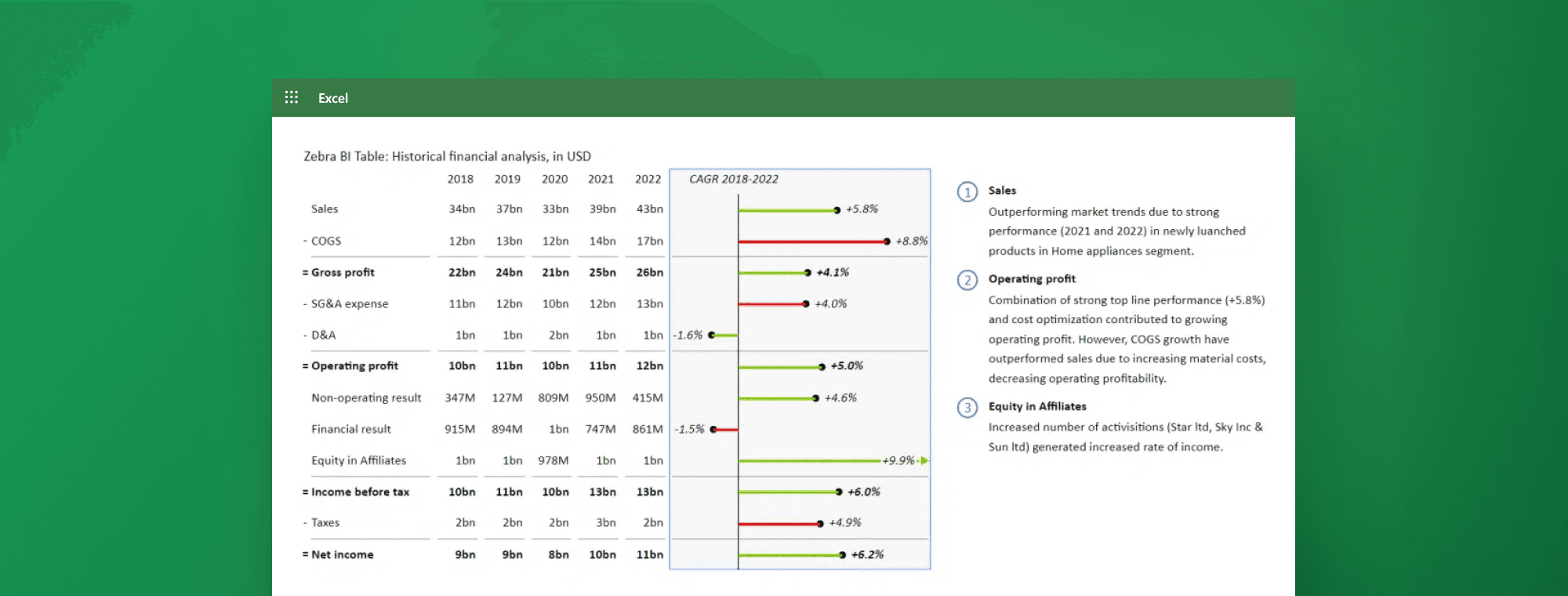
Picture this: you're staring at rows of sales data, product prices, and quantities sold, knowing your revenue numbers are buried somewhere in that spreadsheet chaos. Whether you're tracking income for a small business, analyzing product performance, or building financial projections, calculating total revenue accurately is the foundation of sound financial decision-making. Even as professionals explore the best AI for financial modeling to streamline their workflows, mastering Excel's revenue calculation methods remains essential for anyone who works with numbers. This article cuts through the confusion and shows you seven practical approaches to calculate revenue in Excel, each one designed to save you time and reduce errors, all within the next 30 minutes.
Since you're already working in spreadsheets, why not let AI handle the heavy lifting? Numerous's spreadsheet AI tool transforms how you approach revenue calculations by understanding your data structure and generating formulas that match your specific needs. Instead of wrestling with nested functions or wondering if your SUM formula captured every cell, you can describe what you need in plain language and watch as the right calculation appears.
Table of Contents
Summary
Spreadsheet errors are widespread, with 88% of spreadsheets containing mistakes that stem from inconsistent data structures rather than formula issues. Sales data arrives in fragments with changing column headers, shifting product categories, and missing periods. When your data foundation constantly shifts, every forecast built on top becomes unreliable, and patterns hide in plain sight when you're staring at numbers instead of analyzing movement over time.
Mid-market companies experience predictable revenue stagnation, with 73% hitting growth plateaus between $10M and $25M in annual revenue. Part of that plateau stems from operational systems that worked at a smaller scale but collapse under complexity. The forecast method that felt adequate at $5M becomes a liability at $15M because it can't handle the variables, and growth requires systems that scale with revenue.
Poor forecasting creates cascading resource allocation failures across the entire business. When sales forecasts lack a clear methodology, you approve campaigns based on optimistic estimates or delay critical hires because models double-count one-time dips, wasting money on bets you shouldn't have made and missing opportunities you should have funded.
Data preparation accounts for the majority of time spent on financial modeling tasks, with over 320,000 users relying on tools to simplify revenue calculations. Clean data determines whether your next 25 minutes run smoothly or turn into a debugging session. Transaction-level calculations make revenue easier to verify because you can trace any discrepancy back to its source without unraveling the entire model.
The test of a good revenue system is whether someone else can use it without asking questions. A revenue workflow should become easier to maintain over time, not harder, and the difference between manual chaos and a structured process isn't just speed but also reliability, which lets you focus on interpreting results instead of fixing problems.
Teams using a spreadsheet AI tool describe their data needs in plain language and automatically apply formulas across hundreds of rows, cutting forecast prep time from hours to minutes while maintaining the structured calculation logic.
Why Businesses Struggle to Calculate Revenue in Excel

Business owners don't struggle with revenue calculations because Excel lacks the right formulas. They struggle because forecasting demands clean data, visible patterns, and a repeatable method. Most people have numbers scattered across sheets, but no system to transform those numbers into projections they can actually trust.
When Your Data Fights Back
Sales data arrives in fragments. One month uses product categories. The next month, the switch to regional codes. Dates skip weeks. Column headers change without warning. According to research from partners.wsj.com, 88% of spreadsheets contain errors, and most of those errors stem from inconsistent data structures rather than formula mistakes. When your foundation shifts constantly, every forecast built on top of it becomes guesswork dressed up as analysis.
The problem compounds when you try to spot trends. You glance at monthly totals, notice revenue climbed last quarter, and assume growth will continue. But you are missing the seasonal dip that occurs every March. You overlook the product line that's been declining for six months, while another compensates. Patterns hide in plain sight when you're staring at numbers instead of analyzing movement over time.
The Method You Don't Have
Most forecasting happens through instinct rather than process.
You pick a growth rate that feels reasonable.
You average the last three months and extend that line forward.
You adjust numbers manually based on gut feeling about market conditions.
Each approach produces different results, and none of them can be explained when someone asks how you arrived at your projection.
Assumption Documentation and Logic Transparency
Assumptions drive every forecast, whether you document them or not. You're betting on:
Growth rates
Seasonality
Market stability
Customer retention
When those assumptions live only in your head or are buried inside formulas, the forecast becomes impossible to update or defend. Someone questions your numbers, and you can't reconstruct the logic that produced them.
Automated Forecasting and Logic Simplification
Teams using tools like Numerous's spreadsheet AI tool describe their data in plain language and watch structured forecasting methods appear without building complex formulas from scratch. The system handles pattern recognition and applies consistent methodology across periods, transforming scattered sales data into projections that can be explained, adjusted, and reused. Instead of wrestling with whether your FORECAST function captured the right variables, you focus on whether your assumptions about market conditions still hold.
Why Quick Answers Create Slow Problems
The rush to get a number kills forecast reliability. You need the next quarter's projection for tomorrow's meeting, so you skip data cleanup. You ignore structural issues. You build something that works once but collapses when you try to update it next month. The forecast delivers a number, but it doesn't create a system you can trust over time. But missing revenue targets isn't just about bad formulas or messy spreadsheets. The real damage happens in the decisions you make based on forecasts you can't rely on.
Related Reading
The Hidden Cost of Calculating Revenue Without a Clear System

Unreliable forecasts don't just produce wrong numbers. They erode confidence in every decision that depends on those numbers. When your sales projection shifts by 20% between Monday and Thursday because you changed how you averaged the data, you stop trusting the forecast. When your team can't explain why this quarter looks different from last quarter using the same spreadsheet, planning becomes guesswork. The hidden cost isn't the bad forecast itself. It's the strategic paralysis that follows when nobody believes the numbers anymore.
When Growth Stalls Because the Forecast Can't Keep Up
Research from Ignite XDS shows that 73% of mid-market companies with annual revenue between $10M and $25M experience revenue stagnation. Part of that plateau stems from operational systems that worked at a smaller scale but collapse under complexity. A founder who could mentally track 50 customers and forecast revenue on intuition hits a wall at 500 customers across three product lines and two regions.
The forecast method that felt adequate at $5M becomes a liability at $15M because it can't handle the variables. Growth doesn't just require more revenue. It requires systems that scale with revenue, and forecasting is one of the first places where it breaks.
The Compounding Cost of Rebuilding Instead of Updating
Every time you rebuild a forecast from scratch, you're not just losing hours. You're losing institutional knowledge. The assumptions you made last quarter disappear. The seasonal patterns you noticed three months ago get forgotten. Someone new joins the team and has no idea why certain adjustments exist in the spreadsheet or what the formulas actually calculate.
So they start over, building their own version with their own logic. Now you have two forecasting methods producing different numbers for the same business. Meetings turn into debates over whose model is right rather than discussions of what the forecast means for strategy. The time cost multiplies because you're not iterating on a system. You're repeatedly starting from zero.
When Budget Decisions Depend on Numbers, You Can't Defend
Forecasts drive resource allocation. Marketing spend, hiring plans, inventory orders, and cash reserve decisions all flow from projected revenue. But when the sales forecast lacks a clear method, those downstream decisions inherit that uncertainty. You approve a $200K marketing campaign based on a Q3 revenue estimate, then realize two weeks later the estimate was too optimistic because it didn't account for customer churn. You delay a critical hire because the forecast looks weak, only to discover later that the model double-counted a one-time revenue dip.
Strategic Reliability and Process Efficiency
Poor forecasting doesn't just create bad predictions. It leads to poor resource decisions that ripple across the entire business, wasting money on bets you shouldn't have made and missing opportunities you should have funded. Teams using spreadsheet AI tools find they can automate repetitive forecast calculations while maintaining clear assumptions, turning revenue projections from manual guesswork into repeatable workflows. Instead of rebuilding formulas each month, they update inputs and let consistent logic handle the math, cutting forecast prep time while improving reliability.
The Trust Erosion That Happens Quietly
The most damaging cost is initially invisible. It's the slow erosion of trust in your own data. After the third time your forecast misses the actual result by 30%, you stop using it for real decisions. You start hedging. You build in safety margins so wide they make the forecast meaningless. Your team stops asking what the model predicts and starts asking what you think will happen, because instinct feels more reliable than the spreadsheet. That's when forecasting stops being a planning tool and becomes a compliance exercise. You produce the numbers because someone expects them, not because they inform strategy. And once that trust is gone, rebuilding it requires not just better formulas, but proof over time that the new method actually works.
7 Ways to Calculate Revenue in Excel in 30 Minutes

You can forecast sales data in Excel in 30 minutes by applying a few structured methods that turn past data into clear projections. The focus is not on complex models, but on using simple techniques that make your forecasts consistent and easy to update. These seven methods work because they prioritize clean data, clear patterns, and structured assumptions over complexity.
1. Start With Clean Sales Data
Organize your historical sales data before you build anything else. Make sure it includes dates in chronological order, consistent formatting across all entries, and no missing periods that create gaps in your timeline. Forecasting depends on patterns in your data. If the data is inconsistent (switching between monthly and quarterly views, mixing product categories mid-year, or leaving blank cells where sales were zero), the forecast becomes unreliable. The same issue arises in financial planning and inventory management: incomplete data can create phantom trends that don't exist. You remove confusion early, making every step after easier. When your data is clean, you spend time analyzing patterns instead of hunting for errors.
2. Identify Trends in Your Data
Look for patterns like growth over time, seasonality, or sales cycles before you project forward. Forecasts should be based on patterns, not isolated numbers. The critical difference is recognizing what drives your sales. If your revenue spikes every December but you treat it as a random variation, your projections will miss the pattern entirely. If you notice a 15% quarterly growth rate but ignore it, you're guessing instead of calculating. You understand what is driving your sales before projecting forward. This step transforms raw numbers into insight, and insight into reliable forecasts.
3. Use Average Growth Rate
Calculate how your sales have grown over time to establish a simple and reliable baseline for projections. Take your ending value, divide it by your starting value, raise it to the power of one divided by the number of periods, then subtract one. It provides a baseline by smoothing volatility and giving you a single number that represents your trend. If your sales grew from $100,000 to $150,000 over four quarters, your average quarterly growth rate is approximately 10.7%. That number becomes your anchor for future projections. You move from guessing to using actual data. This method works for revenue, customer acquisition, or any metric that changes over time.
4. Apply the FORECAST Function
Use Excel's FORECAST function to predict future values based on existing trends. It calculates projections by fitting a line to your historical data points and extending it into the future. It works because it uses all your data points, not just the most recent ones. Type `=FORECAST(future_date, known_sales, known_dates)` and Excel generates a projection instantly. If your sales have been climbing steadily, the function extends that climb. If they've been flat, it projects flat. You generate forecasts quickly without complex setup. The function handles the math, and you focus on interpreting the results.
5. Use FORECAST.ETS for Seasonality
Use FORECAST.ETS for time-based data with recurring patterns, such as monthly or yearly cycles. It accounts for seasonality by detecting regular fluctuations and incorporating them into projections. According to Ajelix, over 320,000 users rely on tools that simplify revenue growth rate calculations, reflecting how common it is to need seasonality adjustments in forecasting. If your sales spike every holiday season or dip every summer, FORECAST.ETS captures that rhythm and applies it to future periods. Type `=FORECAST.ETS(target_date, values, timeline)` and Excel does the rest. You get more realistic projections with minimal effort. Ignoring seasonality means your forecast will be wrong twice a year, every year.
6. Create Multiple Scenarios
Build different projections, such as:
Best-case
Average-case
Worst-case
To prepare for different outcomes. Forecasts depend on assumptions, and those assumptions can change in response to market conditions, competitor actions, or internal capacity.
Scenario Planning and Risk Preparation
What most miss is that a single forecast creates false confidence. If you project 20% growth but the market slows, your budget breaks. If you project 5% growth but demand surges, you miss the opportunity. Building three scenarios (conservative at 5%, moderate at 12%, and aggressive at 20%) gives you a range to work within. You prepare for a range of outcomes rather than relying on a single number. This approach shifts forecasting from prediction to preparation.
7. Keep Assumptions Separate
Store growth rates and assumptions in separate cells instead of hardcoding them into formulas. It makes forecasts easier to update and adjust when conditions change. The failure point is usually buried in formulas. If your growth rate is typed directly into a calculation (`=B2*1.15`), changing it means editing every formula. If it's stored in a separate cell (`=B2*$G$2`), changing one number updates every calculation instantly. You create a reusable system instead of a one-time calculation. This method works for growth rates, discount assumptions, tax rates, or any variable that might change. Version-control your assumptions like you would code, and you'll never lose track of why a forecast changed.
Scalable Efficiency and Data Clarity
The truth is, these methods work because they focus on clean data, clear patterns, simple methods, and structured assumptions. That's what makes forecasting effective. Not complexity, but clarity and consistency. Many professionals waste hours on manual work that could be automated, especially when dealing with repetitive calculations across multiple scenarios. Solutions like spreadsheet AI tools help teams apply these forecasting methods at scale by using AI to handle bulk calculations, pattern recognition, and scenario modeling directly within Excel or Google Sheets. Instead of manually copying formulas across hundreds of rows or rebuilding forecasts from scratch each month, you can delegate the repetitive work while maintaining the structured, collaborative environment you already trust.
Related Reading
The 30-Minute Workflow to Calculate Revenue Faster in Excel

You can calculate revenue in Excel within 30 minutes by following a structured workflow:
Organize your sales data
Automate calculations
Build summary views
Validate the results
The goal isn't just speed; it's creating a process that remains accurate and easy to maintain as your data grows.
Minute 0–5: Organize and Prepare Your Sales Data
Start with a structured sales table that includes:
Date
Product or service
Quantity
Price
Total sale
Revenue calculations depend on clean and consistent data. If your sales data is scattered across multiple tabs or uses inconsistent formatting, every calculation afterward becomes harder to trust.
Data Preparation and Structural Readiness
The first five minutes determine whether the next 25 run smoothly or turn into a debugging session. Serving over 320,000+ users, data preparation accounts for the majority of time spent on financial modeling tasks. Most people underestimate how much cleaner data reduces downstream errors. If you're starting with messy data, consider using tools that standardize formats and prepare your spreadsheet structure before calculations begin. The outcome by minute five should be a clean dataset ready for revenue calculations, not a collection of inconsistencies you'll have to fix later.
Minutes 5–10: Calculate Revenue Per Transaction
Apply formulas like quantity multiplied by price for each sale. Transaction-level calculations make revenue easier to verify and analyze later. When you calculate revenue at the row level, you can trace any discrepancy back to its source without unraveling the entire model. Manual formula building across hundreds of rows introduces errors. One misplaced cell reference, one inconsistent range, and your totals become unreliable. Instead of copying formulas manually, generate and apply them across the dataset automatically. By minute 10, the revenue for every transaction should be calculated. This foundation supports everything that follows.
Minutes 10–18: Automate Total Revenue Calculations
Use SUM for total revenue and SUMIF for category-based revenue. Manual calculations become unreliable as more transactions are added. When your dataset grows from 50 rows to 500, formulas that worked last month break this month. The problem isn't the formula itself; it's the lack of a dynamic update system. Apply formulas consistently and ensure totals update automatically as new sales data is entered. If you're adding rows weekly and recalculating totals manually, you're spending time on work that should happen instantly. By minute 18, total revenue should update automatically. The spreadsheet becomes a living document rather than a static snapshot.
Minutes 18–23: Build a Revenue Summary View
Create summaries showing:
Monthly revenue
Revenue by product
Sales trends
Raw transaction data is difficult to interpret without organized summaries. You can have perfect calculations and still miss critical patterns if the data isn't structured for analysis.
Summary, Insights, and Performance Synthesis
Summary tables transform rows of transactions into insights. You see which products drive revenue, which months underperform, and where growth is accelerating or stalling. Structure summary tables and organize metrics so the analysis becomes clearer, not more complex. By minute 23, you should clearly see how revenue is performing over time. The summary view is where decisions happen.
Minute 23–27: Review and Validate Your Data
Check for duplicate sales entries
Missing values
Incorrect formulas
Inconsistent categories
Even small inconsistencies can distort revenue totals and reduce trust in the analysis. I've seen revenue reports rejected because a single product category was misspelled across 30 rows, throwing off an entire segment's performance.
Validation and Error Mitigation
Manual checking is tedious and error-prone. Scan the spreadsheet, flag inconsistencies, and quickly identify potential errors. The goal isn't perfection, it's confidence. You need to know that when you present these numbers, they won't unravel under scrutiny. By minute 27, your revenue calculations should be cleaner and more reliable. Validation isn't extra work; it's the step that protects everything you've built.
Minutes 27–30: Finalize and Make the System Repeatable
Ensure your structure is consistent
Formulas update correctly
New sales can be added easily
A revenue workflow should become easier to maintain over time, not harder to maintain. If adding next month's data requires rebuilding formulas or restructuring tables, the system isn't repeatable.
Scalability and Systems Continuity
Validate the structure and ensure the workflow continues functioning as the spreadsheet grows. The test of a good system is whether someone else can use it without asking you questions. If your colleague can't add a row and the totals don't update automatically, the system isn't working as expected. By minute 30, you should have a reusable revenue-tracking system that scales with your business. The workflow becomes an asset, not a task.
What Actually Changes
Before this workflow: You had to calculate totals manually, rewrite formulas repeatedly, fix inconsistent data, and spend time checking revenue figures. The result is that calculations take longer than expected, formulas break as data grows, and revenue insights become harder to trust.
After implementing this workflow: You start with structured sales data, automatically apply formulas, generate summaries quickly, and review cleaner revenue insights. The result is that revenue calculations stay within 30 minutes, you encounter fewer manual errors, and you gain a clearer understanding of business performance. The difference isn't just speed. Its reliability. When your workflow is structured, you spend less time fixing problems and more time interpreting results.
The Core Insight
Calculating revenue is not difficult. What makes it difficult is doing everything manually without a structured process. Once you organize your data, automate calculations, and reduce repetitive work, the workflow becomes faster, more reliable, and easier to maintain over time.
The real challenge isn't the math. It's building a system that doesn't collapse when your data doubles. Most people focus on getting the answer right once, then rebuild from scratch next month. The workflow described here is designed to be used repeatedly, not recreated. Revenue calculations should feel routine, not stressful. When the process is predictable, you can focus on what the numbers mean instead of whether they're correct. But even the best workflow hits friction when you're working with hundreds of rows and dozens of product categories.
Calculate Revenue Faster With Numerous
The problem is not Excel. The problem is spending 80% of your time cleaning data, rewriting formulas, and fixing inconsistent entries instead of analyzing what the revenue numbers mean. That is where the real slowdown happens. Most teams organize sales data manually, build formulas one transaction at a time, and update summaries every time new rows appear. The workflow is correct, but the execution drains hours that should be spent on understanding business performance.
Process Acceleration and Manual Task Delegation
Spreadsheet AI tool lets you prompt the system to structure sales data, apply formulas across hundreds of rows, and automatically organize summaries. You still control the logic. You just stop doing the repetitive setup work. What changes is not the calculation itself. You still use quantity times price, still aggregate by product or region, still validate totals. What changes is how fast you can prepare the data and apply the formulas. Instead of manually formatting inconsistent product names or dragging formulas down 300 rows, you describe what you need and let AI handle the repetitive tasks. The same revenue process runs in minutes instead of hours.
Operational Efficiency and Analytical Focus
This matters when you calculate revenue monthly or quarterly. If the workflow takes two hours every time, that is 24 hours a year spent on setup instead of analysis. Reducing that to 20 minutes frees time to spot declining product lines, compare regional performance, or test different pricing scenarios. The calculation stays reliable. The effort to maintain it drops. Excel gives you the structure to calculate revenue correctly. AI reduces the manual work required to keep that structure clean and up to date. When repetitive tasks shrink, the same workflow becomes easier to run consistently, and you spend more time using the numbers to make better decisions rather than just producing them.
Related Reading
How To Calculate Total Revenue In Excel
How To Make A Financial Report In Excel
How To Categorize Expenses In Excel
Cube Alternative
Best Excel Functions For Finance
How To Create An Expense Tracker In Excel